 Heads-upFree, open-source plugin for Claude Code on Mac
Your Mac will tell you when Claude Code needs you.
It speaks a short line when a task is done or Claude is waiting on you, so you can step away from the screen.
Voices made with ElevenLabs (elevenlabs.io). Powered by Sarvam.
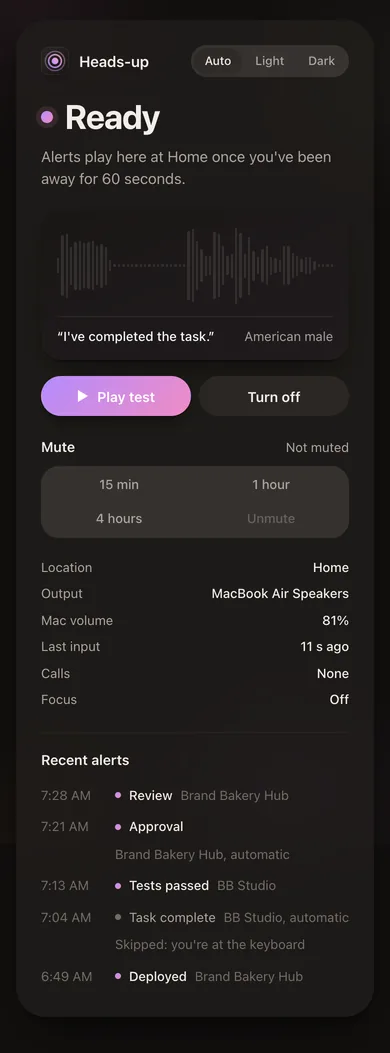
01
Seven voices, built in
They all say the same line here, so you can compare them. They come with the plugin, so you don't need a key or an account.
Voices made with ElevenLabs (elevenlabs.io). Powered by Sarvam.
02
Twenty things it can say
Claude picks the one that fits. Every line starts with “Hello.” and a short pause. Press a line to hear Brian say it.
Needs you
Finished
Problems
Updates
You can switch any of them off on the settings page. With your own voice key you can rewrite them too.
03
When it stays quiet
Before each alert, Heads-up checks six things. If any of them is true, it skips the alert and tells Claude why, so Claude doesn't try again.
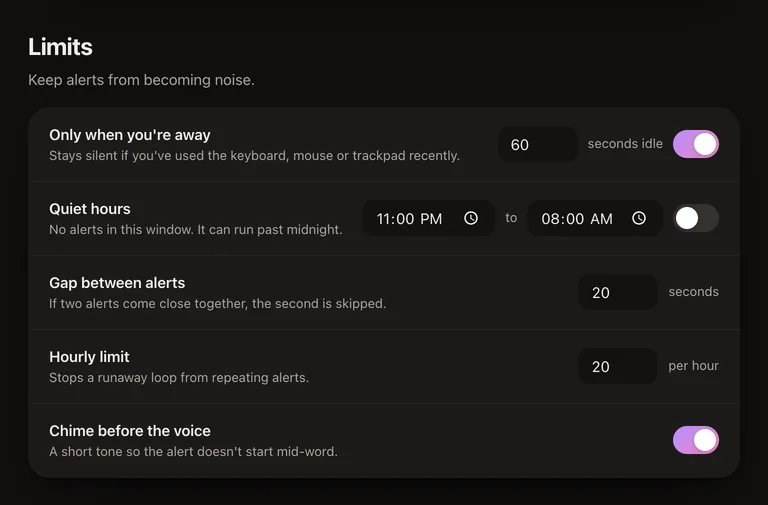
You used the keyboard or mouse in the last 60 seconds.
You're already at the desk. The 60 seconds is adjustable.
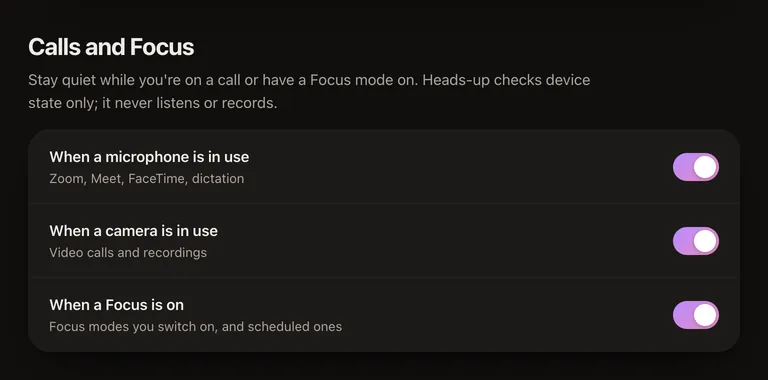
Your microphone or camera is on.
You're probably on a call, and it won't talk over one.
A Focus mode is on.
It follows the Focus settings you already have on your Mac.
It's your quiet hours.
You choose the hours on the settings page.
Your Mac isn't on your home network.
It knows home by your router's hardware address. It never uses GPS or Location Services.
It spoke a moment ago, or has reached its hourly limit.
A long session won't turn into a stream of alerts.
If none of them is true, your Mac says the line.
Volume
If your Mac is muted or turned down, Heads-up raises the volume for the alert and puts it back afterwards. It has hard limits that no setting can go past, and any output it doesn't recognise gets the headphone limit.
50%
Headphones
The most it will ever play through AirPods or headphones
90%
Speakers
The most it will ever play through your Mac's speakers
04
More with your own voice key
Everything above works without a key. Add an ElevenLabs or Sarvam key and Heads-up can record new lines for you.
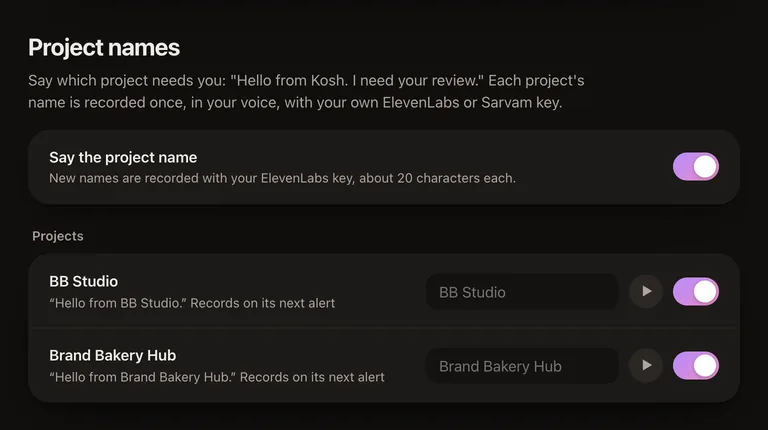
It says which project is calling.
“Hello from Brand Bakery Hub.” Handy when several sessions are running. Each name is recorded once and cached, up to 20 new names a day.
Claude can add a sentence of its own.
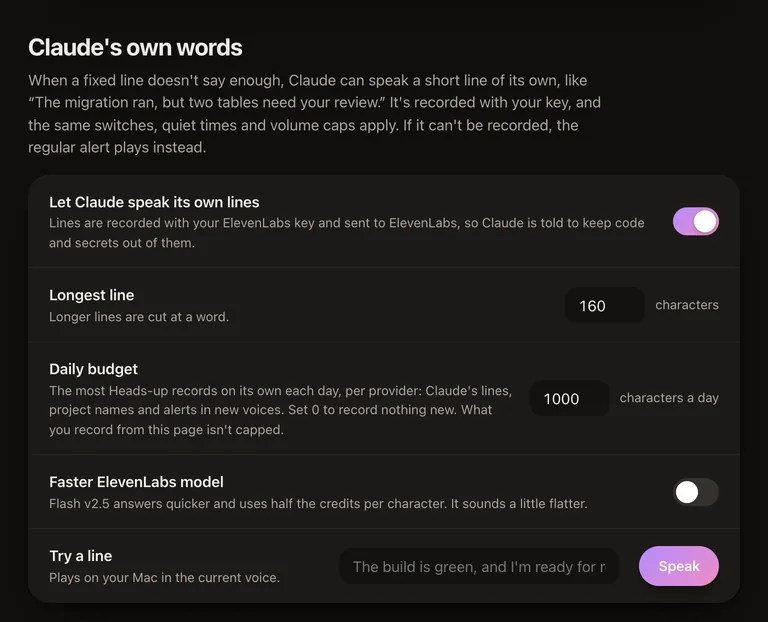
For when the fixed line isn't enough: “The migration ran, but two tables need your review.”
You can rewrite any alert.
Only the line you change gets recorded.
You get more voices.
Any voice in your ElevenLabs account, or any of Sarvam's 37 speakers.
You pay your provider directly, and the amounts are small. A project name is 16 to 25 characters, recorded once per voice. All 20 alerts in a new voice come to about 570 characters, and ElevenLabs' free plan includes 10,000 a month. A daily budget, 1,000 characters per provider unless you change it, caps anything recorded automatically.
The key is stored in the macOS Keychain. It never goes into a file or a log, and the settings page never shows it back to you. Project names and Claude's own words stay off until the key checks out and you switch them on.
05
What stays on your Mac
All of it, unless you add a voice key.
Heads-up is one small Node server and a Swift helper, with no npm dependencies. There's no account and no telemetry.
With a key, the short line being recorded goes to your voice provider and nothing else does. Claude is told to keep code, file paths and secrets out of anything it says.
06
What Claude calls
The plugin adds one tool, notify_user, and a skill that tells Claude to call it once, at the end of a turn where you have to do something, and to leave it alone otherwise.
notify_user({
  status: "review",            // one of 20
  message: "The migration ran, but two tables need your review.",
           // optional, needs your key
  repeat: 1,                   // 1 to 3
  volume: 65                   // optional, always under the caps
})
- Hooks announce permission prompts and turns longer than 2 minutes, even if Claude forgets to call the tool. Background sessions never set them off.
- When a rule blocks an alert, the tool answers “Not played” with the reason, and Claude moves on without retrying.
07
Add it to your agent
Heads-up is a small MCP server with a skill and hooks. One command sets it up in Claude Code, and in Codex too if you use it.
Works withClaude CodeCodex
- Needs
- macOS, Node.js 20 or later, and Claude Code or Codex
- Call detection
- Xcode Command Line Tools
- Lines in your own voices
- ffmpeg, from Homebrew
Install
In Terminal
npx headsup-mcp install- The plugin in Claude Code, and in Codex if you have it
- The call detector, so it stays quiet on calls
- Permission for
notify_user, so alerts don't wait on a prompt - The
headsupcommand
Add
--dry-runto see the changes first. It's safe to run again after an update.In Codex, open
/hooksonce and trust its three hooks. Codex asks again after every update.Or inside Claude Code
/plugin install heads-up --marketplace abhishek207/headsup-mcpJust the plugin. Call detection and the
headsupcommand come with the Terminal install.Hear it
headsup test reviewYour Mac plays this line. Press it to hear it here first.
Ask your agent
Tell me out loud when you're done.
Add it to your next task, then step away. It stays quiet while you're using the keyboard or mouse.
The headsup command
It comes with the Terminal install.
headsupOpens the settings page. It runs on your Mac only, at 127.0.0.1:4777.
headsup statusShows whether an alert would play right now, and what would stop it.
headsup mute 30Quiet for half an hour.
headsup unmuteends it early.headsup say "The build is green."Speaks a line of your own, with your voice key.
headsup uninstallTakes it all out, and keeps your settings.
- Every commandOn, off, usage and the rest, in the README.Read the README
08
Questions
Is it free?
Yes, and it will stay free. There's no paid version. The built-in voices need no account or key. If you add your own ElevenLabs or Sarvam key, they bill you for what you record. The code is open source too, under the GNU GPL v3.
Does it work on Windows or Linux?
Not yet. It's Mac only for now. A Windows version is planned.
Does it work with Codex, Cursor or other agents?
Claude Code and Codex. The Terminal install adds it to Codex if Codex is on your Mac. Open /hooks there once and trust its three hooks, and again after each update. There's no package for Cursor or other agents yet.
Will it talk over my meetings?
No. It stays silent while your mic or camera is in use, while a Focus mode is on and during your quiet hours. It also skips alerts if you've touched the keyboard or mouse in the last minute, because then you're already there.
Will it blast my AirPods?
No. Headphones are capped at 50% and speakers at 90%, and no setting goes past that. If your Mac is muted, it turns up for the alert and then puts the volume back.
Does anything leave my Mac?
Only if you add a voice key. Then the short line being recorded, a project name or Claude's sentence, goes to your provider. There's no telemetry and no Heads-up account. Claude is told to keep code, paths and secrets out of spoken lines.
Where is my API key stored?
In the macOS Keychain. It's never written to a config file or a log, and the settings page never shows it back.
How much will a key cost me?
Very little. A project name is 16 to 25 characters, recorded once per voice. A daily budget caps automatic recording at 1,000 characters per provider by default, and ElevenLabs' free plan includes 10,000 characters a month.
What if Claude forgets to call it?
Hooks cover the cases that matter most: permission prompts, and any turn that runs longer than 2 minutes.
Can I change what it says?
Yes, with a key. Edit any alert's wording on the settings page, add voices from your ElevenLabs account or Sarvam's 37 speakers, or let Claude say a short line of its own.
How do I turn it off?
Run headsup off, or headsup mute 30 for half an hour. headsup uninstall removes it completely.
Who made it?
Brand Bakery, a founder-led studio in India. Voices made with ElevenLabs (elevenlabs.io). Powered by Sarvam.
Credits
Voices made with ElevenLabs (elevenlabs.io): Brian, Sarah, George, Alice and Charlie.
Powered by Sarvam: Aditya and Priya, recorded with Sarvam Bulbul v3.
Heads-up is free and will stay free. There is no paid version.
It's an independent project, not affiliated with Anthropic, ElevenLabs or Sarvam.
Open source on GitHub, under the GNU GPL v3. The built-in voice clips are not covered by it.
Heads-up, by Brand Bakery. Voices made with ElevenLabs (elevenlabs.io). Powered by Sarvam.